


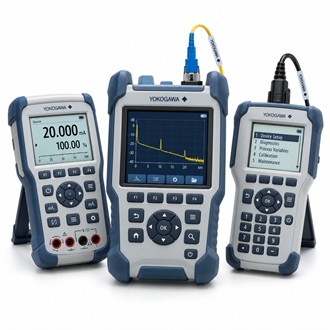
Practical selection notes for Yokogawa CA500
Yokogawa CA500 is a portable calibrator. This page puts the product identity and system checks first so the complete configuration can be compared with the installation. Use the exact code CA500 in the enquiry and verify it against current manufacturer documentation.
| Selection point | Specification / confirmation |
|---|---|
| Representative model | CA500 |
| Instrument | Portable calibrator |
| Functions | Confirm available source/measure modes |
| Application | Field instrument checks |
| Scope | Leads, accessories and calibration documents |
Application snapshot
CA500 is listed as a portable Yokogawa calibrator. Define which signal functions and ranges are required for the work and verify the exact CA500 configuration from its documentation. A calibration task should state whether the instrument must source, simulate or measure the target signal and how the result will be judged. Keep the full Yokogawa CA500 designation attached to the equipment tag, system drawing and purchase documentation. This helps distinguish CA500 from a similarly named module or a package that includes additional hardware.
System connections
Inspect the CA500 connection terminals, leads, condition, calibration status and available functions before comparing packages. Confirm any temperature-sensor accessories, communication options or carrying equipment separately. Follow the approved electrical safety and loop-isolation procedure when connecting Yokogawa CA500 to installed equipment. Keep the full Yokogawa CA500 designation attached to the equipment tag, system drawing and purchase documentation. This helps distinguish CA500 from a similarly named module or a package that includes additional hardware.
Pre-order review
- Required signal types and measurement ranges
- Source/measure mode and terminals
- Lead set, accessories and calibration status
- Test limits and traceability record
What to retain after installation
A useful CA500 record includes the test function, range, instrument under test, reference standard, applied values and as-found/as-left results where applicable. Verify that the unit is within calibration before use. For a quotation on Yokogawa CA500, specify the required functions, accessory package and traceability documents. Keep the full Yokogawa CA500 designation attached to the equipment tag, system drawing and purchase documentation. This helps distinguish CA500 from a similarly named module or a package that includes additional hardware.
Before the order is released
For Yokogawa CA500, provide the quantity, delivery requirement, complete order code, equipment tag and reason for purchase. Identify the associated station, sensor, converter, cable, terminal board or other connected equipment, as applicable. State which accessories and technical documents must be included. Compare the offered CA500 configuration with the approved requirement before releasing the order, and clarify any proposed substitute or deviation in writing.
Final checks at receipt
At receiving inspection, verify Yokogawa CA500 against the order and nameplate, then check package contents and requested documentation. Before installation, confirm that the code matches the system drawing and the intended location. If a mismatch is found, pause the change and have it reviewed by the responsible engineer. Retain the supplied model, system revision, configuration, test evidence and restoration notes together so future support for CA500 can be based on the equipment actually installed.
