


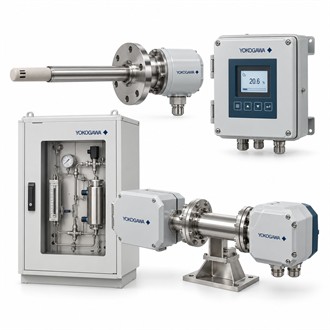
Product Fit and System Interfaces for Yokogawa ZR802S-M-E-N-N/H
Yokogawa ZR802S-M-E-N-N/H is zirconia oxygen analyzer converter. This product brief places the code and selection points near the top, then walks through application fit, system interfaces and handover checks. Use the complete ZR802S-M-E-N-N/H designation when comparing the supplied item with the installed equipment.
| Selection point | Specification / confirmation |
|---|---|
| Representative model | ZR802S-M-E-N-N/H |
| Product family | ZR802S |
| Listed product | ZR802S Zirconia Oxygen Analyzer Converter |
| Representative code | ZR802S-M-E-N-N/H |
| Configuration review | Analyzer family |
Operating requirement
For Yokogawa ZR802S-M-E-N-N/H, agree on the relevant installation and functional checks before work begins. Verify the correct connection, configured behavior and system indication under an approved procedure. Record the as-left code, associated equipment, configuration, any calibration or communication settings and the test result. This gives future maintenance a traceable record for ZR802S-M-E-N-N/H rather than relying on an unqualified family-level description. Keep the complete Yokogawa ZR802S-M-E-N-N/H code attached to the equipment tag, drawings and purchase record. A shortened family description can omit important option details, so verify the delivered ZR802S-M-E-N-N/H against the approved configuration before installation.
Integration details
Yokogawa ZR802S-M-E-N-N/H is listed as a zirconia oxygen analyzer converter. Confirm its compatible detector/probe and system configuration. For Yokogawa ZR802S-M-E-N-N/H, start with the equipment nameplate, the application requirement and the connected system. Keep the complete ZR802S-M-E-N-N/H code in the enquiry so the supplied version is not confused with a similar family member or an accessory with a different function. Keep the complete Yokogawa ZR802S-M-E-N-N/H code attached to the equipment tag, drawings and purchase record. A shortened family description can omit important option details, so verify the delivered ZR802S-M-E-N-N/H against the approved configuration before installation.
Selection checklist
- Complete model code and nameplate
- Compatible system, sensor or process connection
- Configuration options and package scope
- Installation, communication or measurement verification
As-left record
Verify analyzer system generation, detector/probe, cable, power, outputs, enclosure and process conditions against the installed equipment. Compare the full Yokogawa ZR802S-M-E-N-N/H designation with the installed hardware, signal or process interface, mounting and environmental conditions. Confirm each option against current manufacturer documentation; do not infer a code feature from appearance or a shortened model name. Clarify what is included with ZR802S-M-E-N-N/H and which supporting items are separate. Keep the complete Yokogawa ZR802S-M-E-N-N/H code attached to the equipment tag, drawings and purchase record. A shortened family description can omit important option details, so verify the delivered ZR802S-M-E-N-N/H against the approved configuration before installation.
Procurement information
For Yokogawa ZR802S-M-E-N-N/H, include the complete model code, quantity, equipment tag, application and delivery requirement in the enquiry. Identify the connected station, sensor, network switch, analyzer or process interface as applicable. State the required accessories and documentation, and confirm whether the item is supplied alone or as part of a larger assembly. Compare the offered ZR802S-M-E-N-N/H scope with the agreed requirement before releasing the purchase order.
Configuration record
At receipt, verify Yokogawa ZR802S-M-E-N-N/H against the nameplate, order and supporting documents. Before installation, reconcile the code with the current drawing and confirm the package boundary. If any interface or suffix differs, pause and have the variance reviewed. Retain the as-installed ZR802S-M-E-N-N/H, connected equipment, configuration, verification results and restoration notes together so subsequent maintenance can identify the actual supplied version.
