


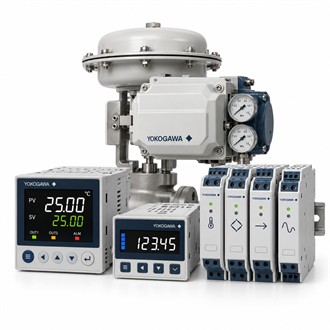
Configuration and Compatibility Notes: Yokogawa UT35A-010-10-00
Yokogawa UT35A-010-10-00 is listed as digital indicating controller. This page separates the model identity from the compatibility checks. The summary table below is a starting point; it does not imply that related codes are interchangeable. Preserve UT35A-010-10-00 exactly in enquiries and service records.
| Selection point | Specification / confirmation |
|---|---|
| Representative model | UT35A-010-10-00 |
| Product family | UT35A |
| Listed product | UT35A Digital Indicating Controller |
| Representative code | UT35A-010-10-00 |
| Scope note | Confirm exact host, function and package contents |
Product scope
Review sensor input, control action, outputs, alarms, supply, communications, panel cutout and full option code. Compare the full Yokogawa UT35A-010-10-00 designation with the installed hardware, signal or process interface, mounting and environmental conditions. Confirm each option against current manufacturer documentation; do not infer a code feature from appearance or a shortened model name. Clarify what is included with UT35A-010-10-00 and which supporting items are separate. Check Yokogawa UT35A-010-10-00 against the current nameplate and manufacturer documentation before replacement.
Compatibility check
For Yokogawa UT35A-010-10-00, retain the full code with the equipment tag, parent-device model, approved spare-parts list and installation record. Where the exact component function is not specified, confirm it before substitution or order release. Check Yokogawa UT35A-010-10-00 against the current nameplate and manufacturer documentation before replacement.
Verification checklist
- Exact part/model code
- Compatible host equipment
- Revision and physical/electrical fit
- Replacement or commissioning record
Service evidence
Yokogawa UT35A-010-10-00 is listed as a UTAdvanced digital indicating controller. Confirm input, control and output options for the loop. For Yokogawa UT35A-010-10-00, start with the equipment nameplate, the application requirement and the connected system. Keep the complete UT35A-010-10-00 code in the enquiry so the supplied version is not confused with a similar family member or an accessory with a different function. Check Yokogawa UT35A-010-10-00 against the current nameplate and manufacturer documentation before replacement.
Information required for an enquiry
Provide Yokogawa UT35A-010-10-00, parent equipment model, equipment tag, installed location, quantity and the current spare-parts or system documentation. Confirm revision, interface and package contents. For parts whose exact function is not stated, request confirmation before specifying a substitute. Record the received code and post-installation checks with the maintenance history.
Related model codes
- UT35A-022-10-00
- UT35A-101-11-00
- UT35A-L00-10-00
- UT35A-L00-11-00
