


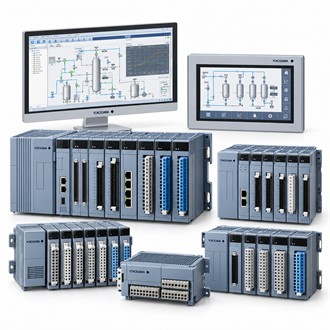
Operating Context and Selection of Yokogawa PM4S7400-V11
Yokogawa PM4S7400-V11 is listed as industrial software package/license. The table below summarizes the available identification and scope checks. For PM4S7400-V11, verify the complete code against the actual nameplate and supporting documents; this page does not imply that nearby model codes are interchangeable.
| Selection point | Specification / confirmation |
|---|---|
| Representative model | PM4S7400-V11 |
| Product family | PM4S7400 |
| Listed product | PM4 Series Industrial Software Package |
| Representative code | PM4S7400-V11 |
| Scope note | Confirm exact function, compatibility and entitlement |
Selection boundary
PM4S7400-V11 is listed as a Yokogawa DCS/plant software package; its exact function and entitlement require confirmation. For Yokogawa PM4S7400-V11, start with the equipment nameplate, the application requirement and the connected system. Keep the complete PM4S7400-V11 code in the enquiry so the supplied version is not confused with a similar family member or an accessory with a different function. Keep Yokogawa PM4S7400-V11 associated with the correct equipment tag, configuration and purchase record.
Evidence to confirm
For Yokogawa PM4S7400-V11, retain the full identifier, parent equipment, verified function and acceptance evidence. Where the source does not define a part's exact function, obtain confirmation before substitution or order release. Keep Yokogawa PM4S7400-V11 associated with the correct equipment tag, configuration and purchase record.
Checks before ordering
- Full model code/nameplate
- Parent system and interface
- Revision and package contents
- Acceptance documentation
Order release
Check supported platform and release, license scope, quantity, delivery format, installation environment and support entitlement. Compare the full Yokogawa PM4S7400-V11 designation with the installed hardware, signal or process interface, mounting and environmental conditions. Confirm each option against current manufacturer documentation; do not infer a code feature from appearance or a shortened model name. Clarify what is included with PM4S7400-V11 and which supporting items are separate. Keep Yokogawa PM4S7400-V11 associated with the correct equipment tag, configuration and purchase record.
Enquiry and receiving information
Include Yokogawa PM4S7400-V11, quantity, parent equipment model, equipment tag, required interface and package boundary in the enquiry. Attach a nameplate image, spare-parts list, system drawing or software entitlement record where available. Confirm the delivered code and contents at receipt, then document installation and functional checks for PM4S7400-V11.
Related model codes
- PM4CKM-V11
- PM4CPJT-V11
- PM4S7700-V11
- PM4S7710-V11
- PM4S7720-V11
- PM4SSET-V11/N1000
